Project management, rethought

For teams who've been making do without one

jME gives your team a real home for their work — Kanban, sprints, timesheets, timelines, and AI, all in one place. Set up in 10 minutes. Available in 20 languages.

20
Languages including full RTL
6
Views per board
10 min
To set up your workspace
AI
Included
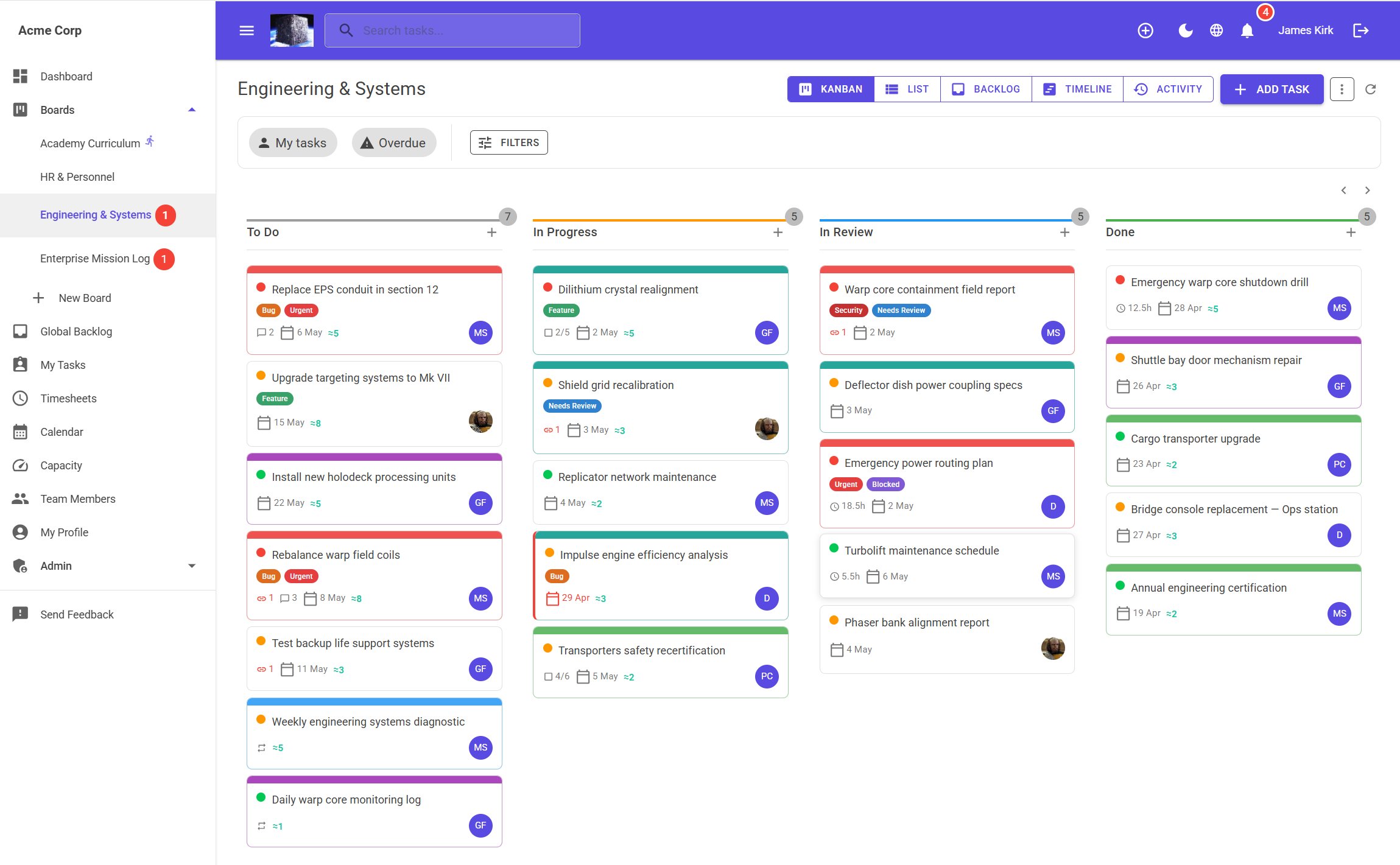
jME Kanban board showing Engineering & Systems board with task cards across To Do, In Progress, In Review and Done columns
Built for the world

Your language,
not an afterthought

jME was built from day one with localisation at its core — every screen, every email, every date format, every notification, in your language.

Arabic, Hebrew, and Urdu users get a fully right-to-left interface — not just flipped text, but a UI designed to read correctly in RTL.

Non-English translations are machine-generated and marked Beta in the app — we welcome corrections. And because localisation is built into the foundation rather than added on top, we can add your language if it isn't on the list. Just ask.

🇬🇧
English
🇫🇷
French
Français
🇩🇪
German
Deutsch
🇪🇸
Spanish
Español
🇮🇹
Italian
Italiano
🇳🇱
Dutch
Nederlands
🇵🇱
Polish
Polski
🇸🇪
Swedish
Svenska
🇵🇹
Portuguese
Português
🇯🇵
Japanese
日本語
🇰🇷
Korean
한국어
🇨🇳
Chinese
简体中文
🇮🇳
Hindi
हिन्दी
🇹🇷
Turkish
Türkçe
🇮🇩
Indonesian
Bahasa
🇻🇳
Vietnamese
Tiếng Việt
🇸🇦
Arabic
العربية
RTL
🇮🇱
Hebrew
עברית
RTL
🇵🇰
Urdu
اردو
RTL
🇬🇧
English (UK)

Every email jME sends — password resets, invitations, weekly digests — arrives in your user's language. Not just the app. Everything.

Non-English translations are machine-generated and marked Beta in the app. We welcome corrections — get in touch.

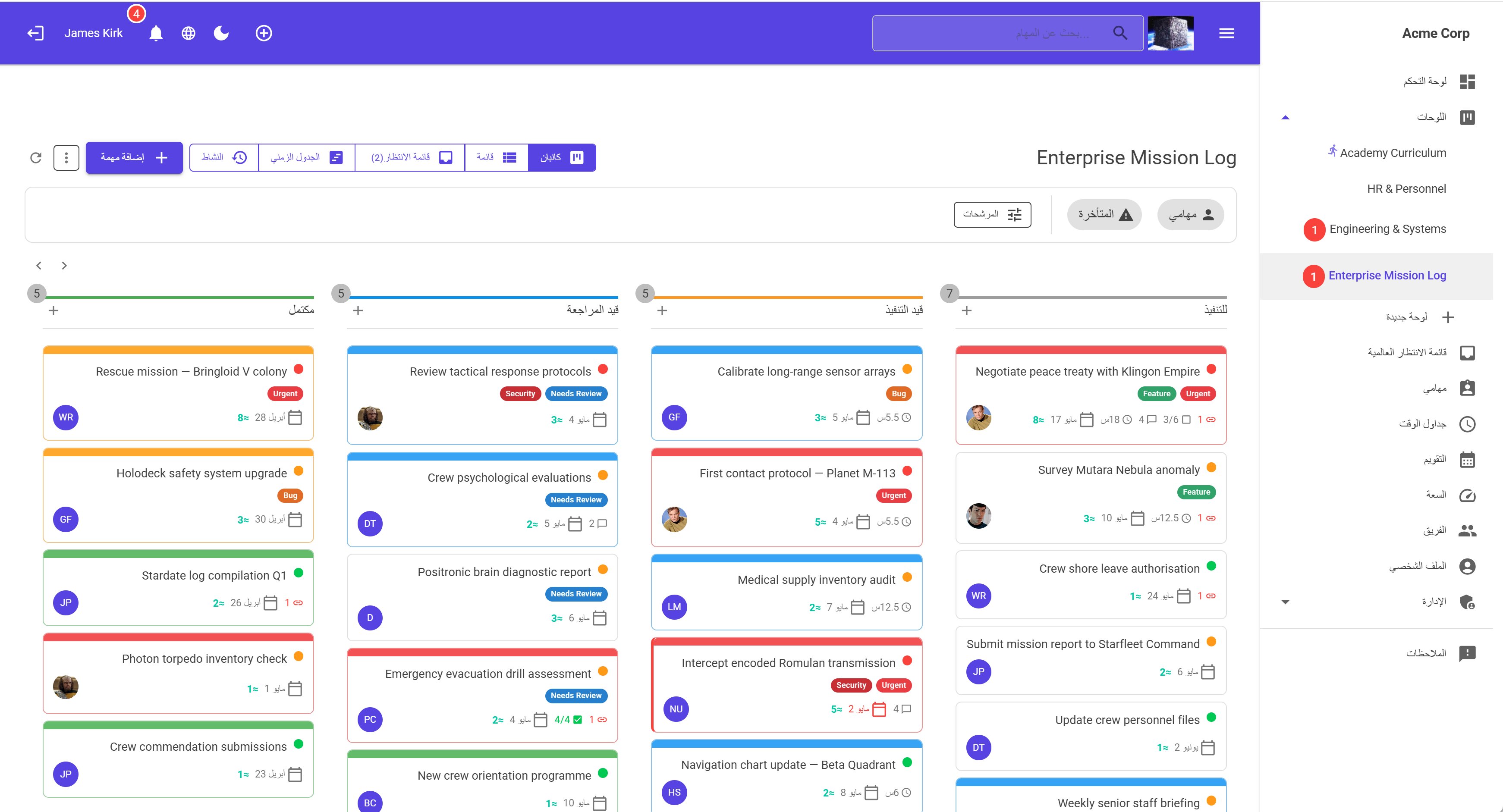
jME fully mirrored Arabic RTL interface — sidebar on right, columns reading right to left, all UI elements correctly mirrored
Right-to-left support

Not just translated.
Truly mirrored.

Most tools translate the text and call it RTL support. jME mirrors the entire interface — sidebar switches sides, columns read right to left, every button, icon, and layout element is in the correct position for Arabic, Hebrew, and Urdu users.

  • Full UI mirror — not just flipped text
  • Navigation, filters, and controls all RTL-aware
  • Emails sent in the user's language and direction
  • Three RTL languages: Arabic, Hebrew, Urdu
Six ways to see your work

The right view for
every kind of team

Not everyone thinks in columns. jME gives you six views on every board — switch instantly, no setup required.

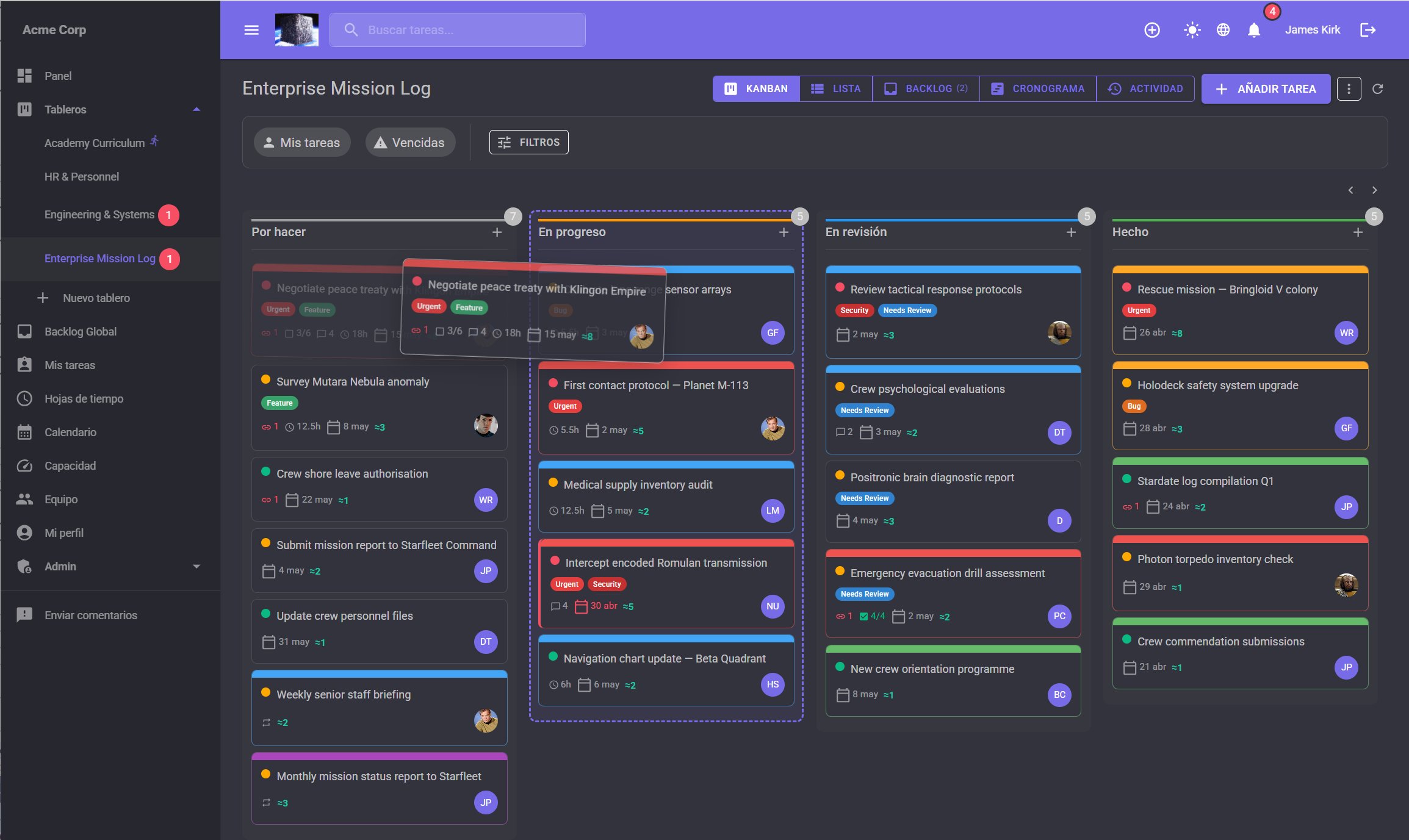
Drag-and-drop Kanban

The classic board view — drag cards between columns, see your whole workflow at a glance. Works with mouse and touch on every device.

  • Custom columns with colour-coded status
  • Filter by assignee, priority, label, or overdue
  • Card covers, effort points, checklist progress
  • Virtualised rendering — fast at any board size
jME Kanban board with drag and drop in progress — dark mode

Sortable List view

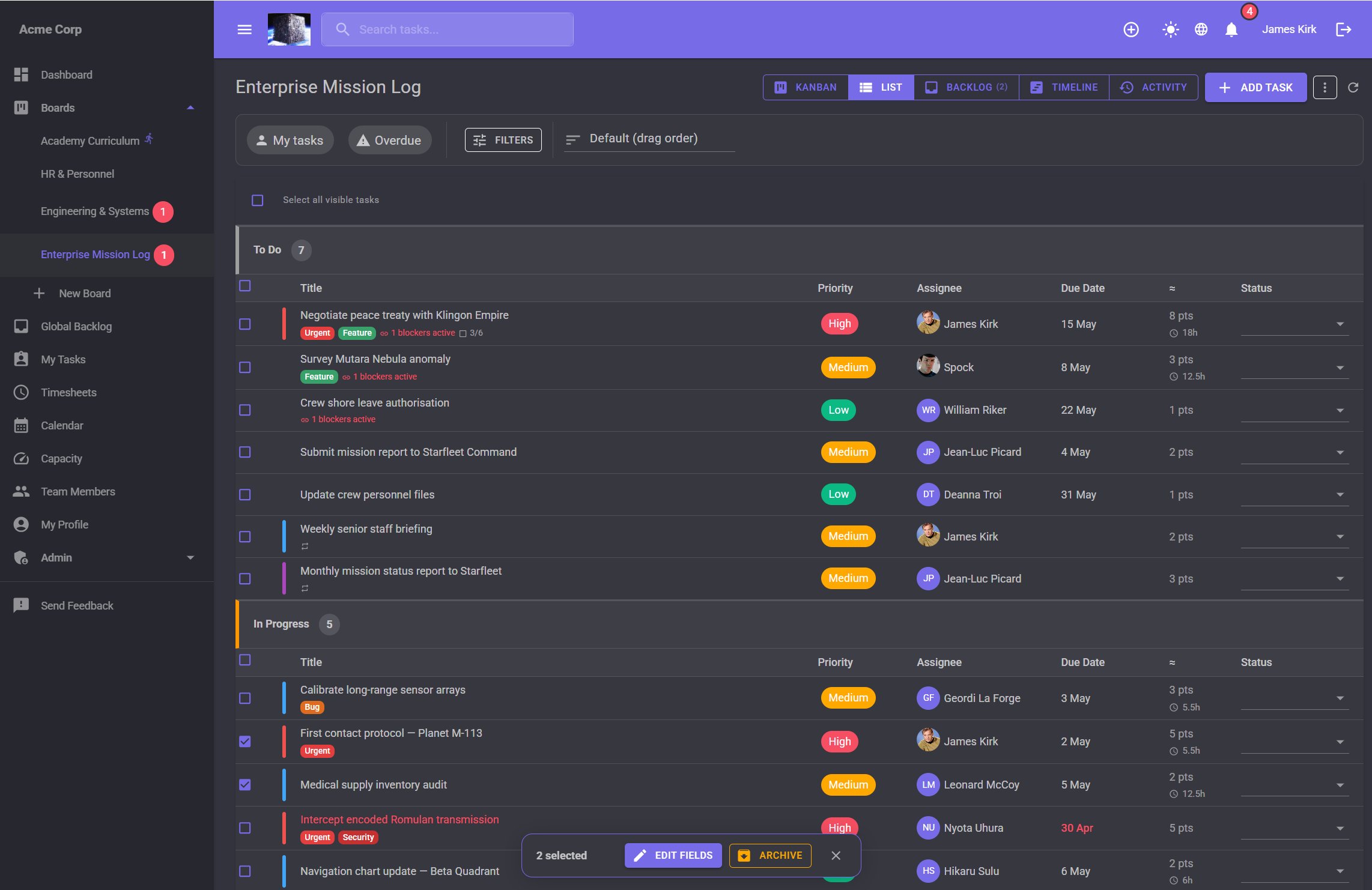
A dense table view for when you need to see many tasks at once. Sort by any column, change status inline without opening the drawer.

  • Sort by priority, due date, assignee, or custom fields
  • Inline status change with one click
  • Bulk selection and batch operations
jME List view with bulk edit popup — 2 tasks selected with Edit Fields and Archive actions

Gantt-style Timeline

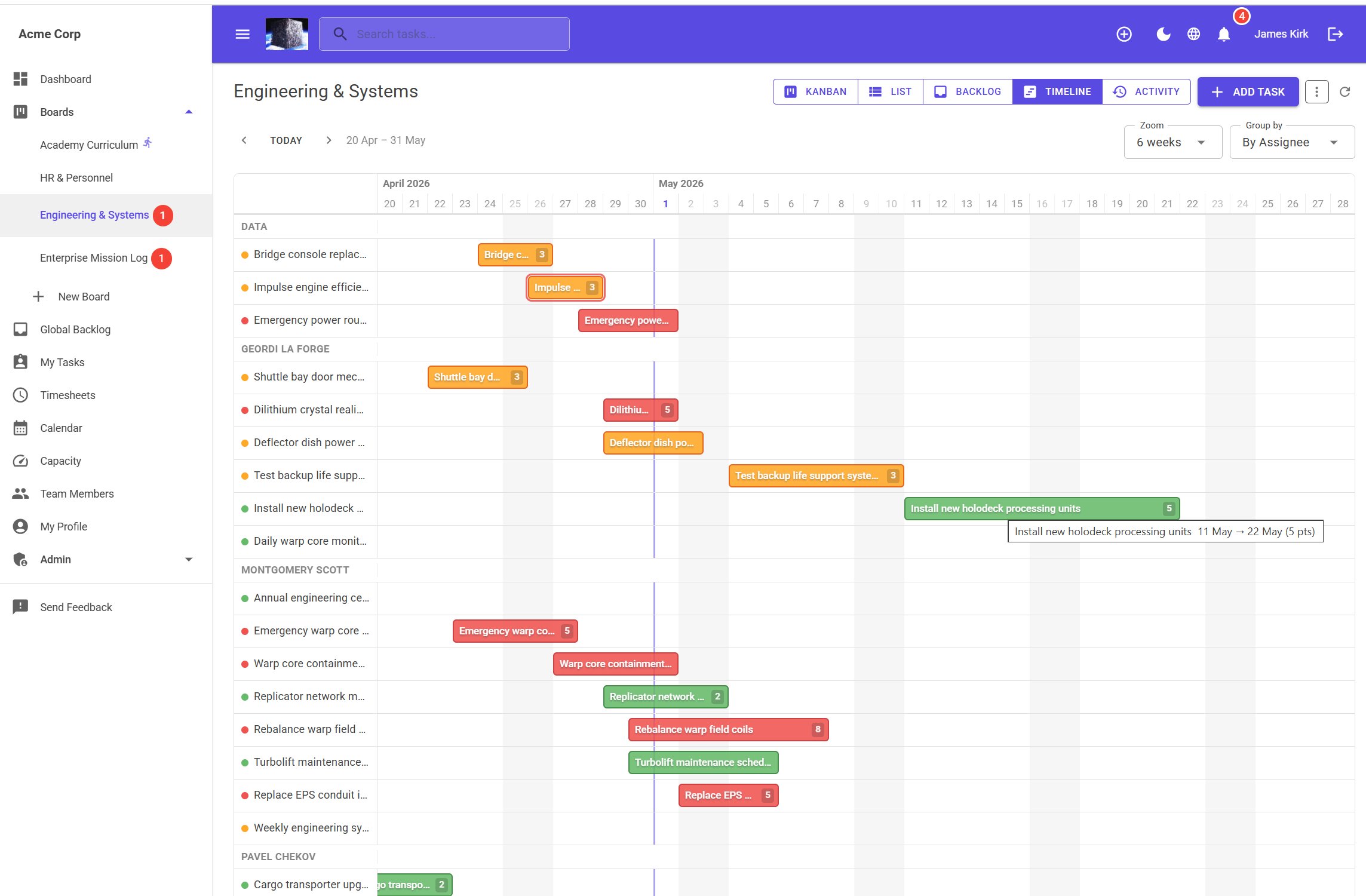
See how your tasks overlap in time. Drag bars to reschedule. Zoom from 4 to 12 weeks. Fully RTL-aware.

  • Drag bars to reschedule — audited in task history
  • Group by assignee or status
  • Priority colours: red, amber, green
  • Overdue tasks highlighted with red outline
jME Timeline view grouped by assignee showing task bars across April–May with tooltip showing date range and effort points

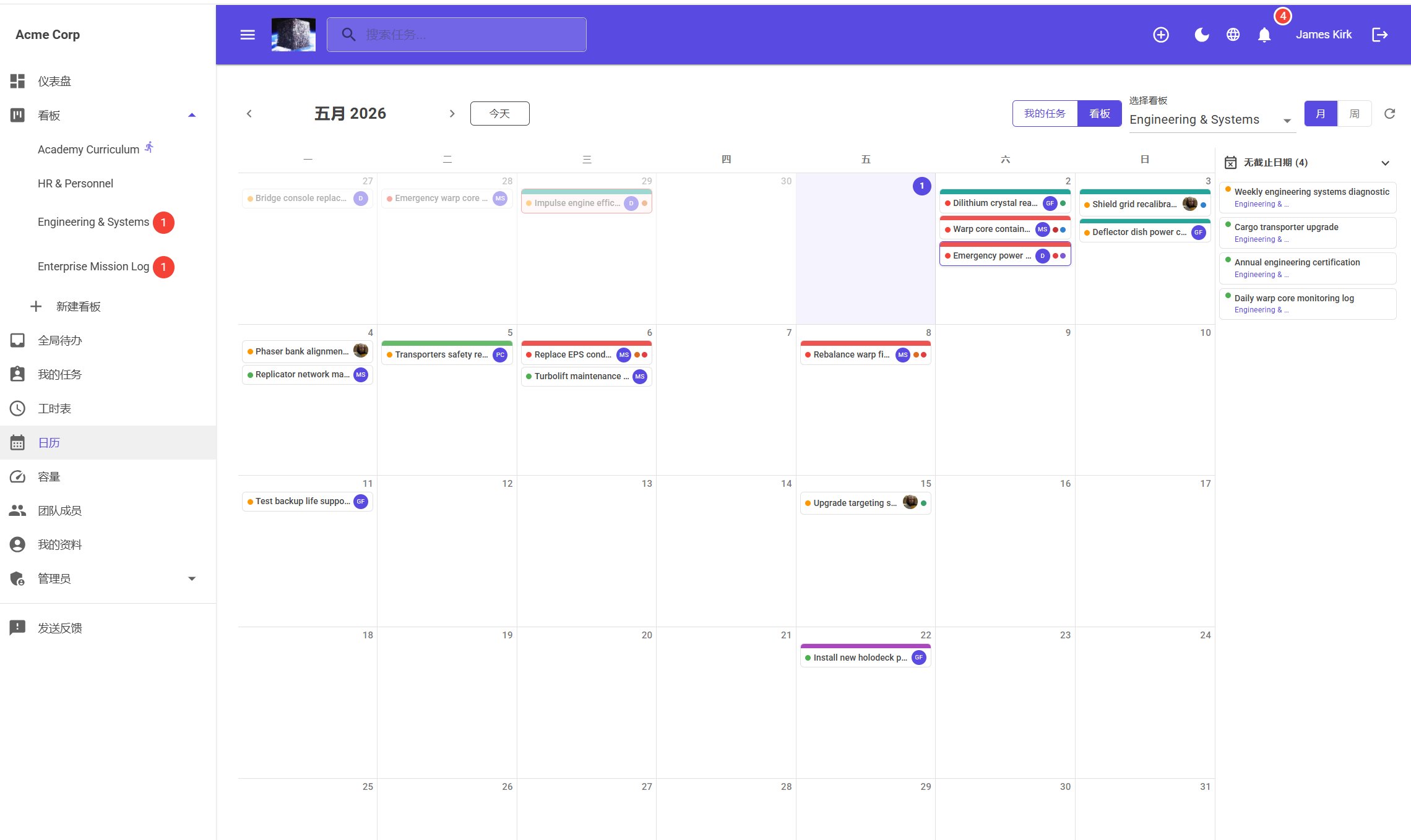
Calendar view

Month and week views for deadline-driven teams. Drag tasks between days to reschedule. See your tasks or the whole team's at once.

  • My Tasks or full board scope
  • Drag to reschedule with full audit trail
  • Undated tasks panel — drag onto calendar to schedule
jME Calendar view in Chinese showing May 2026 month view with task chips and undated tasks panel

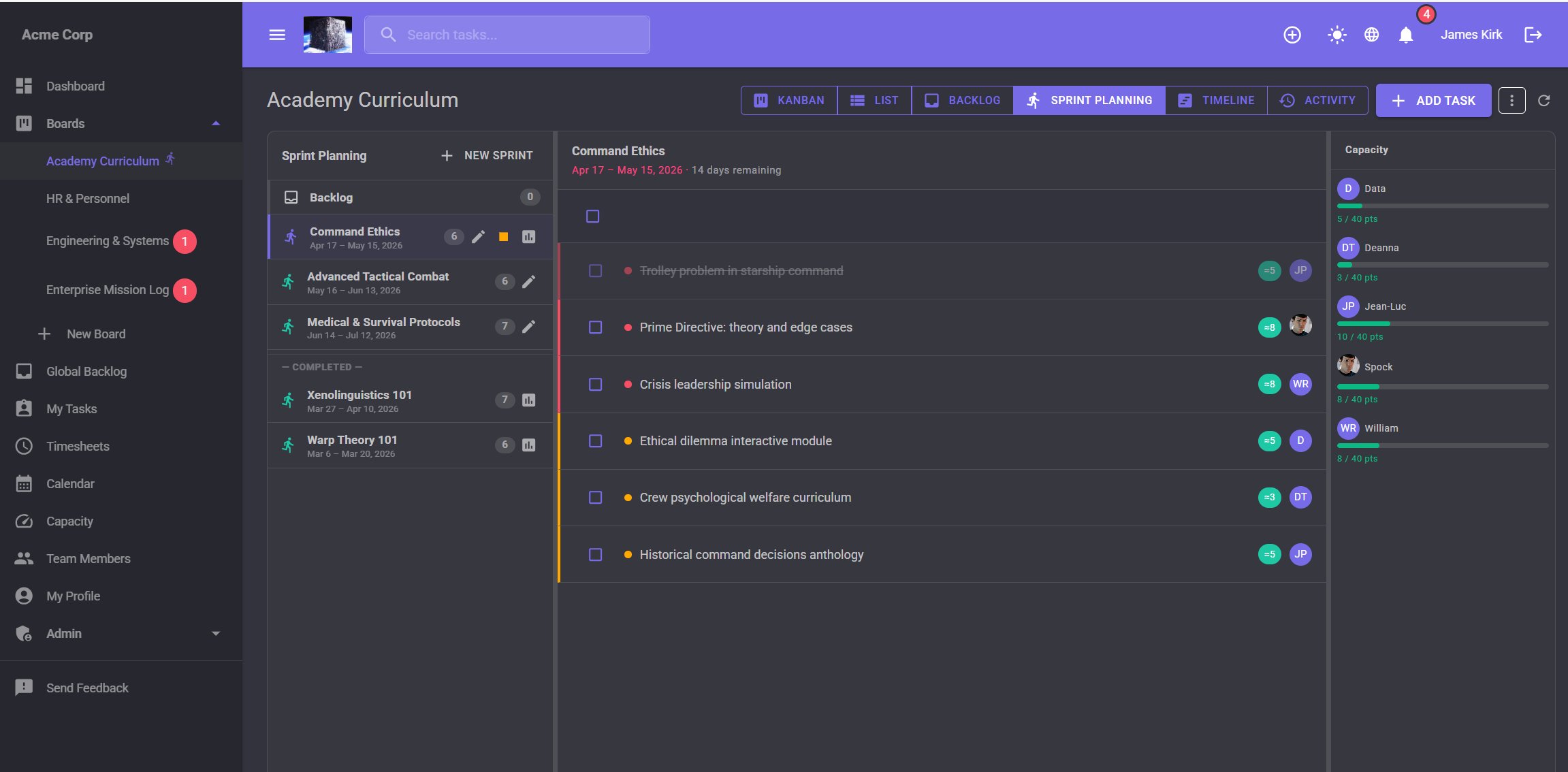
Sprint planning

Full sprint lifecycle — plan, track, review. DevOps-style two-column UI with drag-and-drop from backlog into sprint. Burndown charts and per-sprint reports included.

  • Drag tasks from backlog into sprint
  • Burndown chart — ideal vs actual
  • Sprint report with completion rate
  • Available at the price point where competitors don't include it
jME Sprint planning view showing sprint list, task backlog, and capacity panel with per-person point allocations

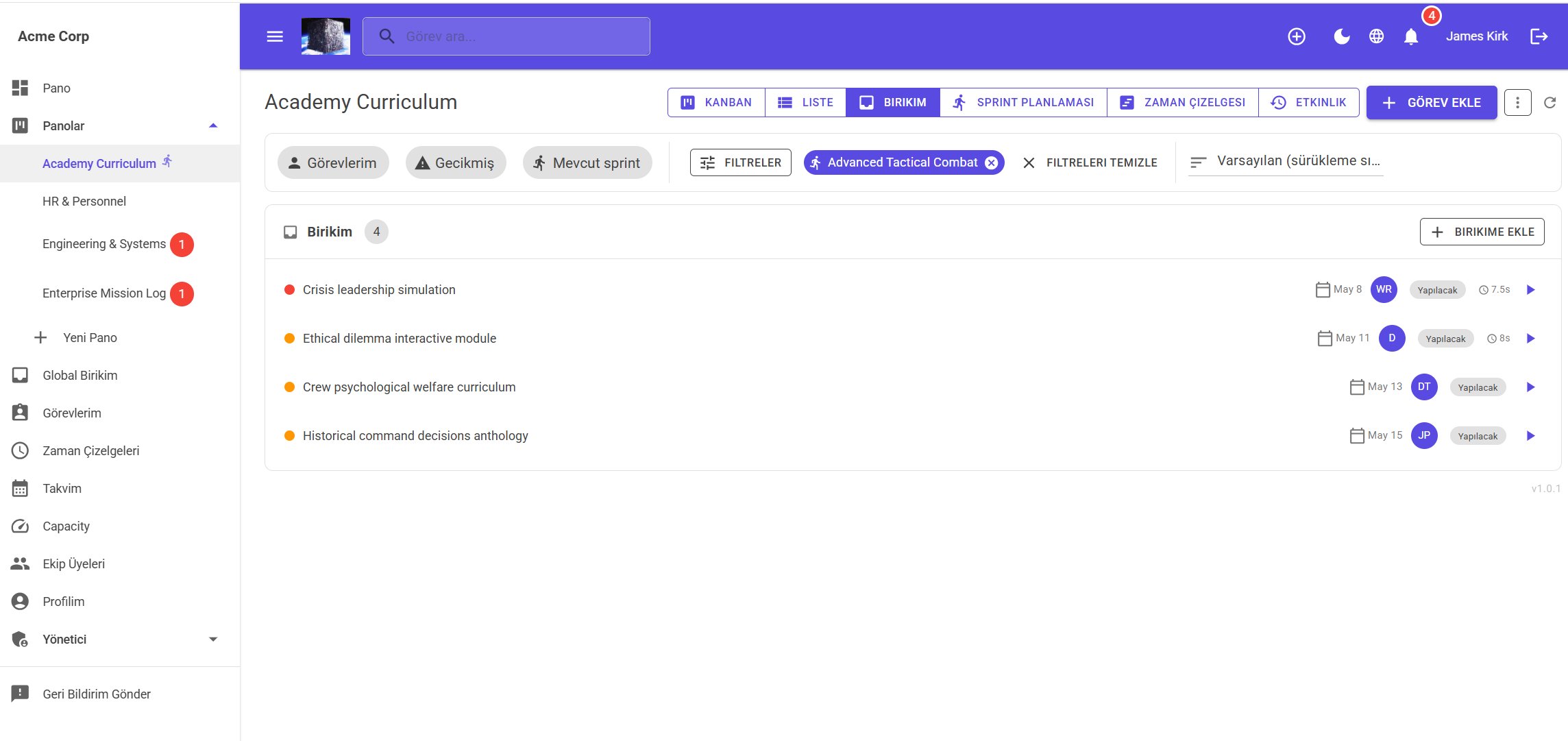
Backlog

A staging area for tasks that aren't ready for the board yet. Reorder by drag. Move to any board when the time is right.

  • Per-board backlog on every board
  • Global backlog — a shared Idea/Planned/Ready board for the whole workspace
  • Move tasks to any board with one click
jME Backlog view in Turkish showing filtered backlog items with assignees, due dates and effort points
What's included

Everything your team needs.
Built in.

Every feature below is part of jME — no tiers, no add-ons, no surprises.

🔔
Real-time notifications
Instant push via WebSocket with automatic fallback to polling. @mentions, assignments, status changes — nothing slips through.
Built-in timesheets
Weekly time grid with lock dates, proxy editing, and downloadable reports. No third-party integration needed.
🔄
Recurring tasks
Daily, weekly, monthly, or custom recurrence rules with natural language scheduling. Set it once and forget it.
📋
Playbooks
Reusable task templates with variable substitution — onboard a new employee, launch a campaign, or run a sprint with one click.
🔍
Full audit trail
Every field change recorded with who, what, old value, new value, and timestamp. Full-text search across all boards.
🔗
Webhooks & API
HMAC-signed outbound webhooks with delivery logs. API keys with rate limiting, usage analytics, and OData feeds for Excel and Power BI.
Workflow automations
Trigger on status change, due date, or assignment. Auto-assign, notify, move, or update custom fields — no code required.
🛡
Granular permissions
Five tenant roles and five board roles. Private boards, Viewer-only access, Commenter-only — the access model you actually need.
🔒
GDPR-ready
Account self-deletion, personal data export, session management, and 2FA. Built in — not a compliance checklist item.
✦ AI features

AI that works
with how you think

jME includes AI features designed to reduce friction where it matters most.

✏️
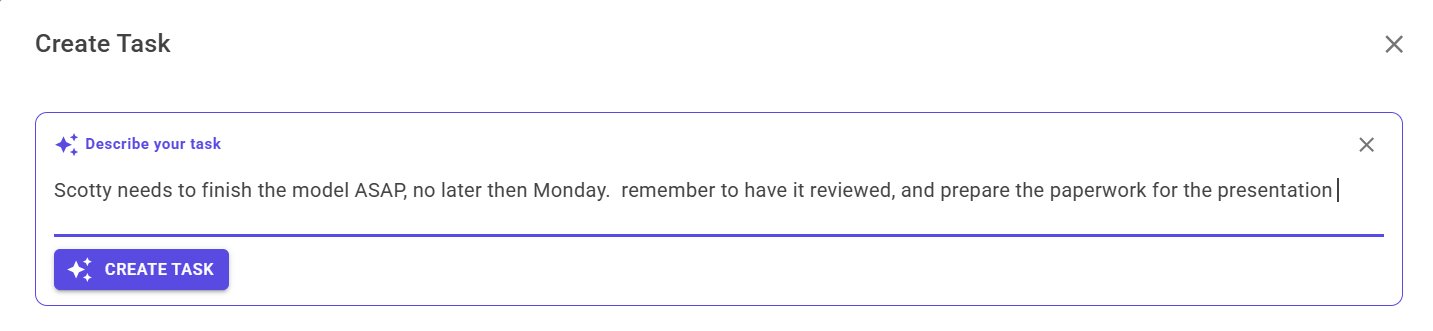
Natural language task creation
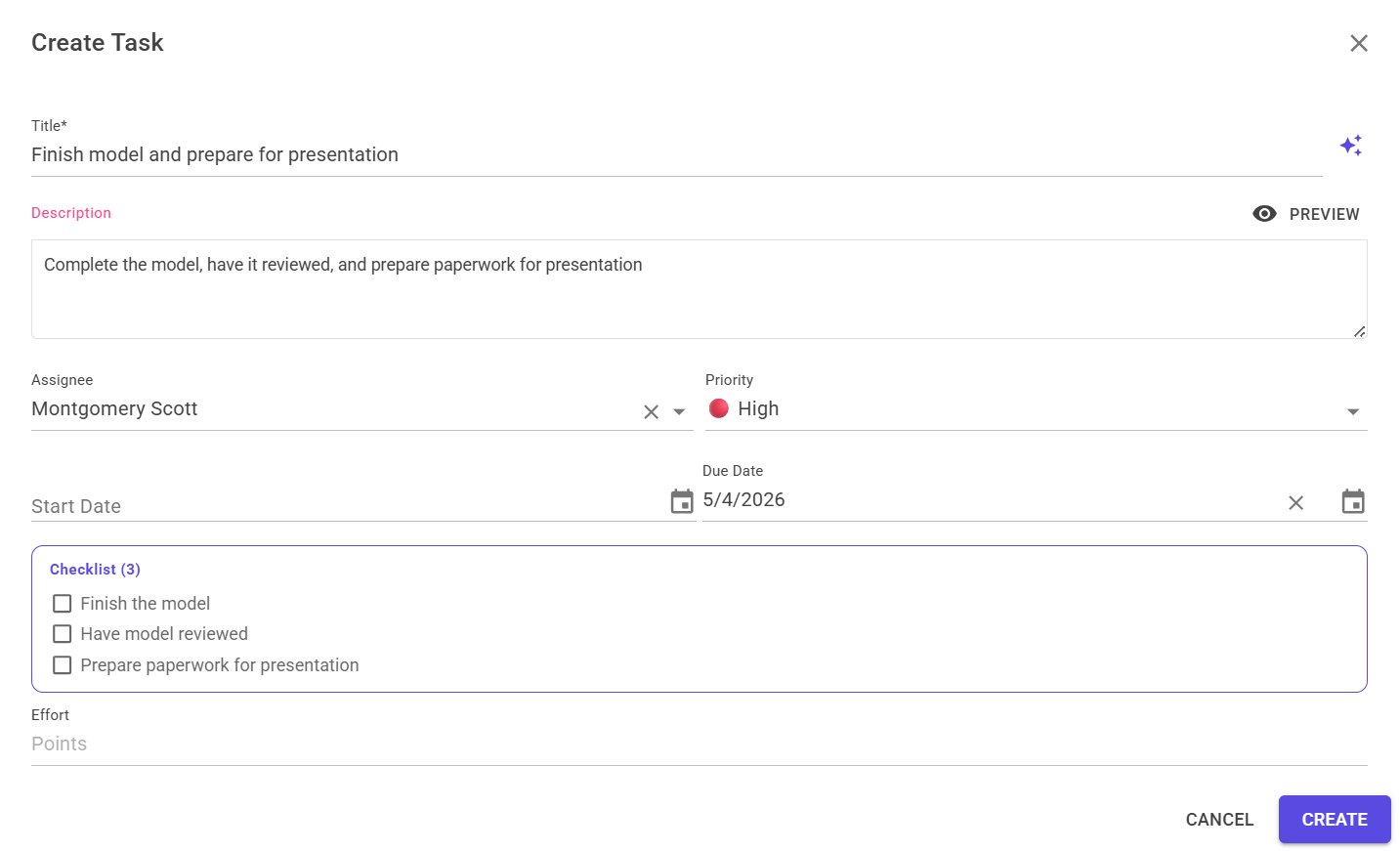
Describe what needs doing in plain language. AI fills in the title, description, priority, and due date — you just review and save.
📅
Smart due date suggestions
AI reads the task context and suggests a realistic due date. Click the chip to accept — no more "I'll set the date later."
📚
AI playbook generation
Describe a workflow in plain English. AI generates a complete reusable playbook with tasks, variables, checklists, and due date offsets.
📧
Weekly digest with AI narrative
Your weekly email digest isn't a list of numbers — AI writes a readable summary of what your team got done and what's coming up.
1 — Describe in plain language
jME AI task creation — natural language input: Scotty needs to finish the model ASAP, no later than Monday
2 — AI fills in title, assignee, priority, due date & checklist
jME AI task creation result — structured task with title, assignee Montgomery Scott, High priority, due date and 3-item checklist generated automatically
Capacity Planning

See who's overloaded before it's a problem

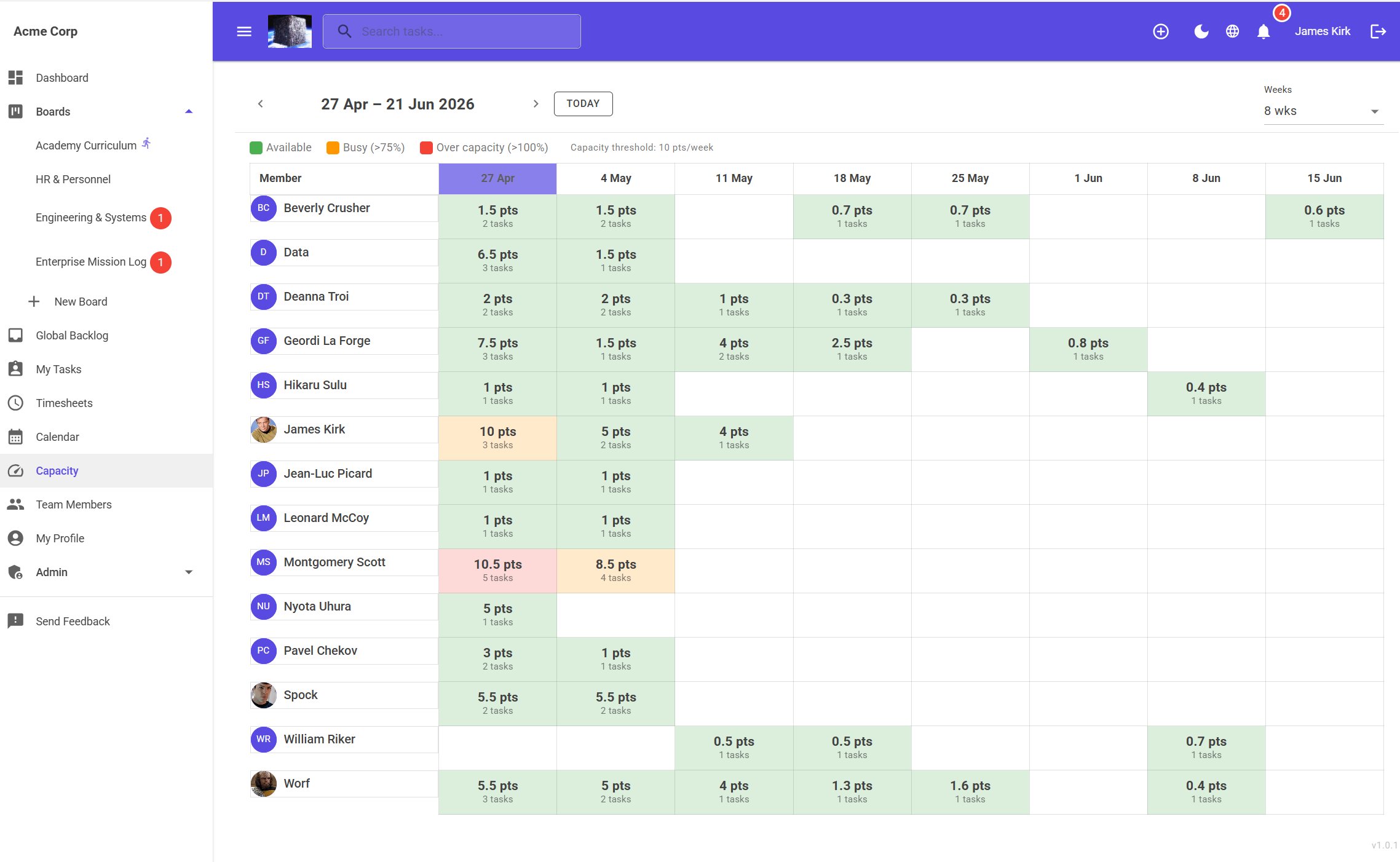
The capacity grid shows every team member's workload week by week — green means available, amber means busy, red means over capacity. Spot bottlenecks at a glance and reschedule before deadlines slip.

  • Colour-coded by threshold — Available, Busy (>75%), Over capacity (>100%)
  • 8-week rolling view, configurable per workspace
  • Click any cell to see the tasks behind the numbers
  • Drag tasks directly on the grid to reschedule
jME Capacity planning grid showing 14 team members with weekly workload colour-coded green, amber and red across 8 weeks
Timesheets

Time tracking that doesn't need a separate tool

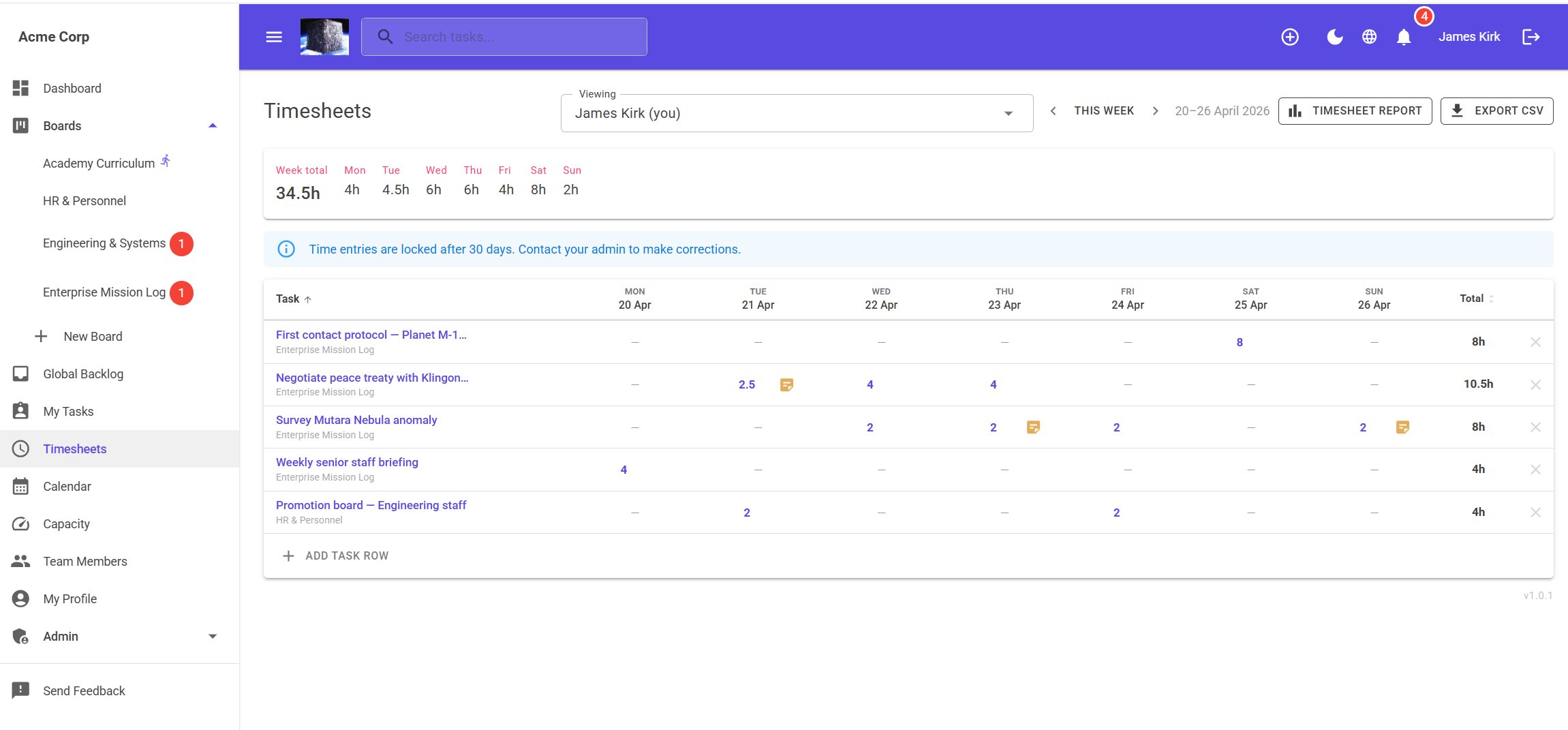
Log hours against tasks in a weekly grid. Lock dates to prevent backdating. Export to CSV or connect to Excel via OData. Reports by person, board, or date range.

jME Timesheets — weekly grid showing 34.5h logged across multiple boards with lock notice and note icons
Sprints

Sprint planning without the enterprise price tag

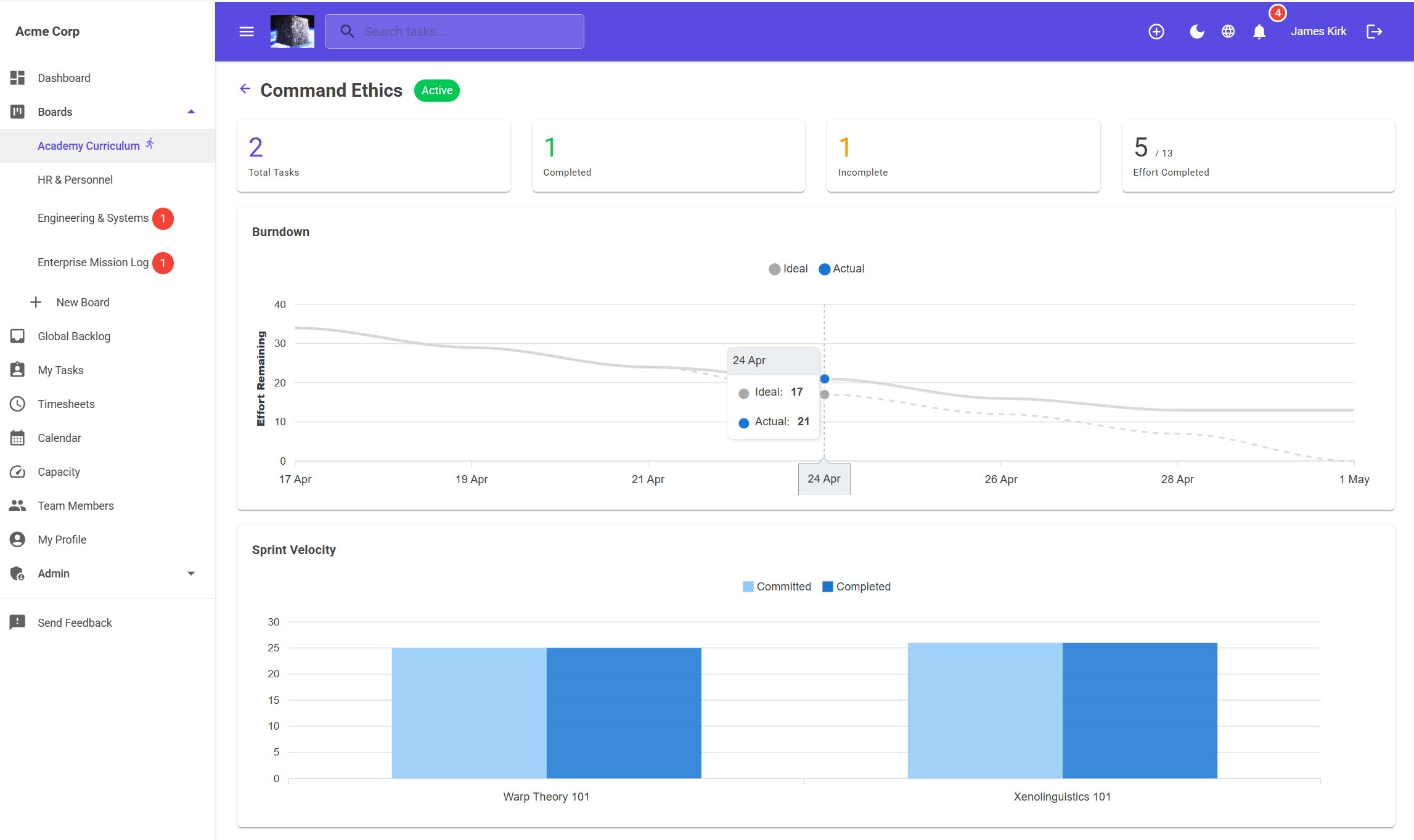
Full sprint lifecycle — plan, track, report. Drag tasks from backlog into sprint. Burndown charts. Per-sprint reports. Included on every plan, not an upgrade.

jME Sprint report showing burndown chart with ideal vs actual lines and sprint velocity bar chart
Currently in evaluation

jME is approaching launch.
We'd love your input.

We're currently in an evaluation phase with select teams. If you're interested in getting early access, shaping the product, or just want to be notified when we go live — get in touch.

Get in touch → Try it ↗
james@jmeconsulting.ca
Alpha
Current stage
20
Languages at launch

Interested in early access?
We'd love to hear from you.

jME is currently in evaluation with select teams. Get in touch to learn more or register your interest.

Get in touch →